
Why I recommend Squarespace over Wordpress for most clients

So, you've decided to get a new website —exciting! But then comes the big question: which platform should it be on? Squarespace? Webflow? Wordpress? It's like trying to choose between three different languages when you're not fluent in any of them. One designer swears by Squarespace, another is obsessed with Webflow, and then there’s Wordpress, the old veteran.
With so many opinions flying around, it’s no wonder you’re left wondering which platform is the best fit for your business. After spending 15 years as a Wordpress devotee, I’ve come to recommend Squarespace—and here’s why.
1. Squarespace is easier to design and build with
What this means for you: You should get an attractive website delivered sooner, and because your designer is not tied up with a fiddly design technology, they should be able to devote more time to your website, content and SEO strategies.
Squarespace offers a What You See Is What You Get (WYSIWYG) drag-and-drop editor, making it simple for anyone to design a website. Wordpress is not natively WYSIWYG - or drag and drop. Wordpress’s back end, where you create your design or update content does not look like the front end which means lots of flicking back and forth to get the results you want. WordPress and third-party businesses have tried to create a WYSIWYG functionality with the Wordpress Gutenberg editor or with plugins like Elementor or SiteOrigin, but the fact remains: Squarespace’s design interface is far more intuitive.
Animation of Squarespace drag and drop, What You See is What You Get functionality.
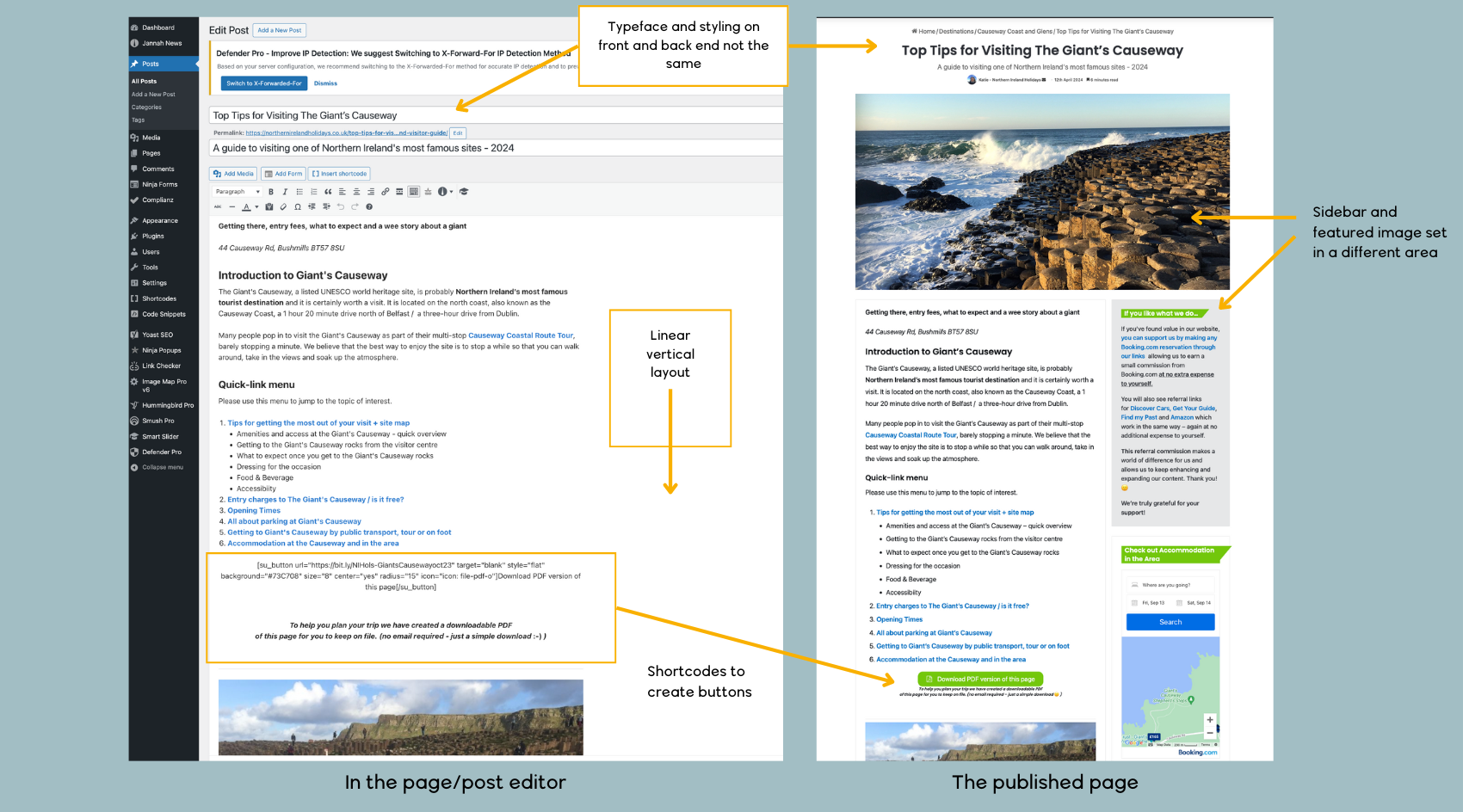
Wordpress is not 'What You See is What You Get' - the image to the left shows the back end of a typical Wordpress blog page, the image to the right shows the published page. Typeface and styling is specified in the theme set up and you often need to use short codes to add things like buttons. Some plugins such as Elementor or SiteOrigin allow you a more flexible layout but they are not intuitive to use.
With WordPress, building even a basic site will require choosing a third-party theme and a selection of plugins which can add complexity and maintenance issues. While this does potentially mean that you have a lot more flexibility, this is only an advantage over Squarespace if you are building a highly customised website with special functionality. For most SMEs, the Squarespace platform gives you all the flexibility and functionality you need.
Squarespace also provides a huge advantage with its Squarespace Blueprint, an AI-powered design tool that helps you generate a custom template. And if you want more control, you (or your designer) can use CSS to take your design to the next level.
2. With Squarespace it is easier to update your website content
What this means for you: If you choose, you (or a member of your staff) will be able to keep your website content fresh and up to date which is good for business.
An up-to-date website is crucial for engaging visitors, building credibility, and boosting SEO. Although some debate this, I’ve found that regular updates make a difference to a site’s SEO. Additionally, fresh content can be shared on social media, tied to your advertising campaigns, and keep visitors coming back.
With Squarespace’s WYSIWYG editor, anyone can easily update their own site. While most marketing professionals have enough WordPress knowledge to post updates, many businesses don’t have in-house expertise. This often results in additional charges for simple content changes and as a consequence, changes are not made. In contrast, if you can use office software such as Word or PowerPoint, you can probably manage content updates on Squarespace, making regular updates easier and more affordable.

I’ve used Wordpress to build client websites for close to 15 years but more recently I became a convert to Squarespace. This user-friendly, all-in-one platform has finally come of age!
3. Squarespace requires little if any maintenance
What this means for you: You will not need to pay an agency for maintenance service, or attempt to do it yourself. Security, maintenance and backups are all included in your Squarespace fee.
Squarespace’s simplicity extends to its maintenance. Unlike WordPress, which requires constant updates for your theme, the different plugins and Wordpress itself, Squarespace handles everything for you.
In Wordpress you must regularly update your theme, the different plugins and Wordpress itself to avoid being hacked or your website going down. Unfortunately, because all the elements have been developed by different developers, they are not necessarily updated at the same time and where you might have had a setup that works harmoniously, one bad update can crash your site. Then there are plugins or themes that just get abandoned by their developers. Generally, it’s a good idea to hire a Wordpress expert to maintain your site and be on standby in case the site goes down.
With Squarespace being an all-in-one managed platform most elements are owned and maintained by Squarespace so there’s less risk of your site breaking or being hacked. Squarespace is doing the backups, updates and looking after security for you. If anything happens, Squarespace will fix it. With Squarespace you don’t need to hire a third-party service for maintenance and be on standby if the site does crash.
To emphasise this point, even though I can earn money maintaining people’s Wordpress websites, it’s a job I do not enjoy.
4. With Squarespace it is easier to scale your site as your business grows
What this means for you: As your business grows you can easily upgrade your package to include other Squarespace tools such as e-commerce that will smoothly integrate into your current site.

Squarespace offers a wide range of tools and applications that, with Wordpress, you would need to source from multiple vendors
Squarespace comes with built-in features that most businesses need right out of the box. From SEO tools to marketing integrations and analytics, you won’t need to rely on multiple third-party plugins as you would with WordPress.
When your business grows and requires additional functionality—such as e-commerce—you can easily add it with a few clicks. Squarespace’s e-commerce solution is excellent, offering an easy-to-use, comprehensive system without the need to install, configure and often pay for extra plugins as you do when using Wordpress’s WooCommerce plugin.
While I have focused on the negative impact of Wordpress plugins, you can get third-party ‘plugins’ with Squarespace which can be an advantage as your site grows. The difference is that with Wordpress you need plugins for very basic functionality so you might have 20 or so plugins installed on your typical Wordpress website. With Squarespace most functionality can be achieved using Squarespace tools, but you can still link in other applications if needed.
5. Squarespace is more cost-effective
What this means for you: Although there is an ongoing subscription fee with Squarespace, the fee includes a lot of features that you would need to pay for separately with ‘free’ Wordpress. In most cases, Squarespace is more cost-effective.

Squarespace monthly subscription fees as at September 2024. Get a big discount if you pay annually!
It’s true that WordPress is ‘free’, but there are additional costs. You’ll need to pay for annual hosting (£100+) and, so that you can get the necessary functionality and support, it is a good idea to pay for premium themes and plugins. These are usually one-time costs so that is an advantage. And I repeat, it’s a good idea to hire a Wordpress expert to maintain your site which can add a significant sum to your annual bill.
With Squarespace, there’s an ongoing fee which starts at £144/year if paid annually. You also have the option to pay monthly although you will be charged a bit more at £16/month. The Squarespace fee includes hosting, security, themes and most of the functionality you’ll need to run a professional website.
One thing to note is that Squarespace does not include email hosting which you would get together with a Wordpress hosting plan. Squarespace recommends using Google Business for your emails but there are cheaper options!
When comparing total costs, Squarespace often turns out to be more affordable and less of a headache for business owners.
Discounts. If you are starting out with Squarespace you can usually find a 20% discount code online for your first payment. To make the most of the discount, pay for your first year in advance and get 20% off the whole year, not just your first month.
6. With Squarespace you get better support
What this means for you: A Wordpress site is put together using software from many different providers who may or may not provide support. In addition, you would have to determine which software was causing the problem. With Squarespace, the buck usually stops with Squarespace.
With Squarespace, you get support, either through a contact form or live chat, or through the active Squarespace forums. While response times can be slow on occasion, the platform is so user-friendly and rock-solid you’ll rarely need to reach out. Squarespace also offers a robust Knowledge Base, tutorials and webinars. Squarespace is always continually updating the functionality of the platform, adding new tools and partnerships, so it is always getting better.
On the other hand, WordPress doesn’t offer centralised support. Since it’s an open-source platform, troubleshooting often means turning to various vendors for support (hosting providers, plugin creators, theme developers), or relying on community forums. This process can be time-consuming and frustrating, especially when problems arise from plugin conflicts or hosting issues. For the average business this means keeping a web designer on retainer to manage these problems.
When choosing WordPress for your website makes sense
While I’m a big advocate for Squarespace, there are scenarios where WordPress might be the better choice:
Multiple websites and email hosting: If you manage multiple websites, WordPress can be cost-effective. For example, one of my clients hosts five different websites under a single hosting package for just £200 a year, and this includes email hosting as well. While Squarespace doesn’t yet offer email hosting, this setup makes WordPress more attractive for clients managing several sites.
Large, Complex Sites: WordPress is better suited for very large, complex websites where there are dedicated developers working in-house. The flexibility and customization options make it a strong contender for enterprise-level sites or projects that require a lot of bespoke functionality.
Conclusion
For the majority of small and medium-sized businesses, Squarespace offers a simpler, more reliable, and cost-effective solution. It allows businesses to focus on what they do best without worrying about maintenance, updates, or endless plugin configurations. While WordPress has its strengths, particularly for complex projects, Squarespace is the clear winner for most businesses seeking a streamlined, professional online presence.

Ready to talk about a new website?
Learn how I can help you build a website designed for growth? Visit our service page and contact me for a quick chat to see if we are a match!
Note quite ready? 10 ways a modern website can help your business grow!